Python Repositories
This section documents configuration and settings specific to Python based repositories
Python Client Configuration
Overview
Python repositories are where software development teams that develop with Python share their code artifacts (libraries, packages, etc.).
The Python Package Index or PyPi, is the public repository where open source and other publicly available artifacts can be uploaded and downloaded.
However, many businesses, private organizations and projects require private Python repositories so that they can build and share libraries within their teams.
CloudRepo is a private, cloud based, artifact repository which provides private Python repositories, through the same API as PyPi, to its users.
This page will help you get started by helping you setup a CloudRepo Python repository.
Pre-Requisites
Note
In the Connection Settings of your repository we provide specific configuration information for your repository.
Before you can use CloudRepo with Python you’ll need to ensure that you have created a Python Repository as well as a Repository User in the CloudRepo Admin Portal.
If you haven’t done this yet, please see the following instructions for doing so:
Note
For security purposes (mostly because passwords tend to be stored in plaintext), we do not allow your admin user to access artifacts via the repositories. Please create a user in the CloudRepo Administrator Portal.
setup.py File
You will need a setup.py file (sample). This is used for building your python distributions.
If you need an intro to building and packaging Python packages, check out the setuptools documentation.
Configure the ~/.pypirc File
Before you upload, you have to add the following lines to your ~/.pypirc file, substituting the appropriate placeholders:
[distutils]
index-servers =
cloudrepo
pypi

[cloudrepo]
repository: https://[your-organization-name].mycloudrepo.io/repositories/[your-repository-name]
username: [repository-user-email-address]
password: YOUR_API_TOKEN
Uploading Python Packages to CloudRepo
To upload to cloudrepo, you’ll need to have twine installed (pip install twine). Then you’ll run the following command:
/usr/local/bin/twine upload dist/* --repository cloudrepo
Files which are successfully published to CloudRepo are immediately available for retrieval and can be seen in the CloudRepo Administrator Portal.
More importantly, these files will now be able to be downloaded with PiP.
Installing Python Packages from CloudRepo
Now, to install the packages from CloudRepo, run the following command, substituting the appropriate placeholders:
pip install --index-url 'https://[repository-user-email-address]:YOUR_API_TOKEN@[your-organization-name].mycloudrepo.io/repositories/[your-repository-name]/simple/' [your-package-name]
After this, your package will be installed on your machine.
Note
The /simple/ path (with the trailing slash) is the canonical PEP-503 simple-API index URL, and it is what every modern Python tool (pip, poetry, uv, pixi) expects for index resolution. The bare repository URL (without /simple/) still works for backward compatibility, but /simple/ is the recommended path going forward. Note that twine upload continues to use the bare repository URL (see the ~/.pypirc configuration above). Only index resolution / package installation uses the /simple/ path.
Python Repository Settings
Overwrite Protection
Overwrite Protection is the default on Python repositories: any repository that has not explicitly turned it off is protected, whenever it was created. With it enabled, uploading a file to a path that already holds one is refused with 409 Conflict and the stored file is left as it is.
Note
Overwrite Protection prevents all overwrites of a file, both through the PyPi APIs as well as the Admin Portal UI.
twine reads the response body and prints CloudRepo’s explanation, so a refused upload tells you why: Attempting to Overwrite an existing file. Overwrites have been disabled for this repository. Python has no mutable-version convention, so there is no equivalent of Maven’s -SNAPSHOT escape hatch here; every file is protected while the setting is on. To republish, either use a new version number or turn Overwrite Protection off for that repository.
Overwrite Protection is a per-repository setting, so a repository that is meant to accept overwrites can have it turned off. Toggle it in the Repository Settings of your Python Repository. For how the setting behaves across every repository type, see Overwrite Protection.
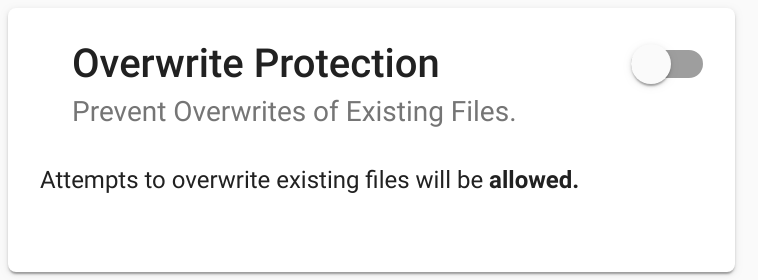
In the above image, Overwrite Protection is disabled and overwrites will be allowed.
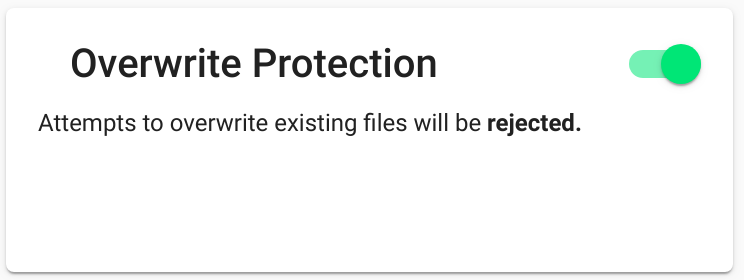
In the above image, Overwrite Protection is enabled and overwrites will be rejected.
Other Settings
All Standard Settings apply.