Your integration guide prints one login that every customer uses.
You ship an SDK from your own Artifactory or Nexus server. It works, right up until someone asks who has access.
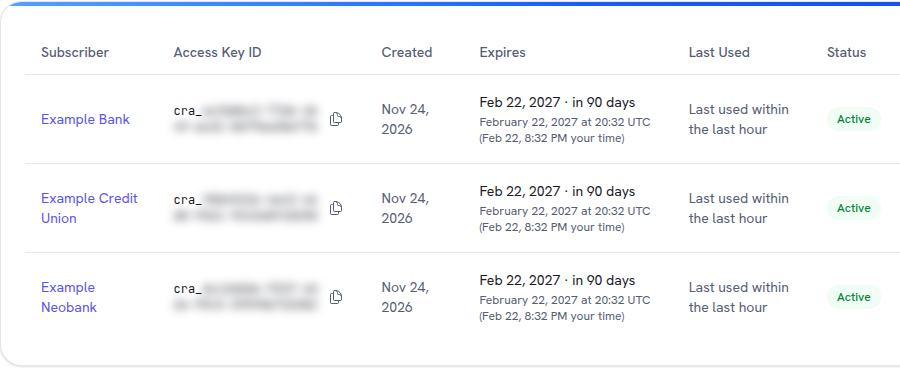
Each customer gets their own key.
When a customer leaves, revoke their key. It stops working at once, and every other customer's key keeps working.
14 days free. No credit card required.
Is that meant to be public?
If it is
Then you could make it a public repository, no login, and nothing to patch. Turn on Public Access and anyone can read the repository without signing in. A push still needs your credentials.
https://your-org.mycloudrepo.io/public/repositories/your-sdk
How Public Access worksWhat you and your customers go through today
- The login sits in public docs, so anyone who reads that page can pull your SDK.
- Every customer signs in with the same login, so you can't cut one off without changing it for all of them, and every one of them has to update their builds.
- You can't tell which customer is using it.
- The server is yours, so uptime, patching and upgrades are on your team. That upgrade work is real. Sonatype's sunsetting page (read ) says a generally available release gets “Bug fixes, support, and security updates provided”, and a sunsetted one gets “No additional features or bug fixes”.
The CloudRepo way
Publish your SDK to a private Maven repository in CloudRepo.
Issue each customer their own key
Add each customer as a subscriber, and put them in a subscriber group that can read that repository. A key has read-only access to the repositories its groups grant.
Issue each customer their own key, with the expiry you pick: 90, 180 or 365 days, a date you pick, or never.

What your customer adds to Gradle
Your customer adds the key to Gradle. They keep building the way they do now; only the repository address and the key are new.
The key goes in their Gradle home, ~/.gradle/gradle.properties, so it never sits in a file they commit:
cloudrepoUsername=ACCESS-KEY-IDcloudrepoPassword=YOUR-SECRETThey keep that file private:
chmod 600 ~/.gradle/gradle.propertiesAnd an Android Studio project lists the repository in settings.gradle.kts:
dependencyResolutionManagement { repositoriesMode.set(RepositoriesMode.FAIL_ON_PROJECT_REPOS) repositories { google() mavenCentral() maven { url = uri("https://your-org.mycloudrepo.io/repositories/your-sdk") credentials { username = providers.gradleProperty("cloudrepoUsername").get() password = providers.gradleProperty("cloudrepoPassword").get() } } }}The dependency goes in the app module the usual way, for example implementation("com.example:your-sdk:1.0.0").
We also do public repositories, and we run and patch it all, so you don't. And your own team gets unlimited users, no per-seat pricing.
More detail: Software Distribution.
Try it with your own SDK.
Publish one release, issue one key, and pull it the way your customer will.
14 days free. No credit card required.

Founder-run since 2016, with no venture capital. A real person answers within one business day. Usually it's me.
Chris, founder of CloudRepo