Proxy Repositories
A proxy repository gives your builds one CloudRepo address for a public repository such as Maven Central. CloudRepo provides proxy repositories for Maven, npm, Python and Docker.
The first request for a dependency fetches it from the upstream repository, and CloudRepo stores a copy in your repository. You can delete the copy, and the next request fetches it from the upstream again.
Creating a Proxy Repository
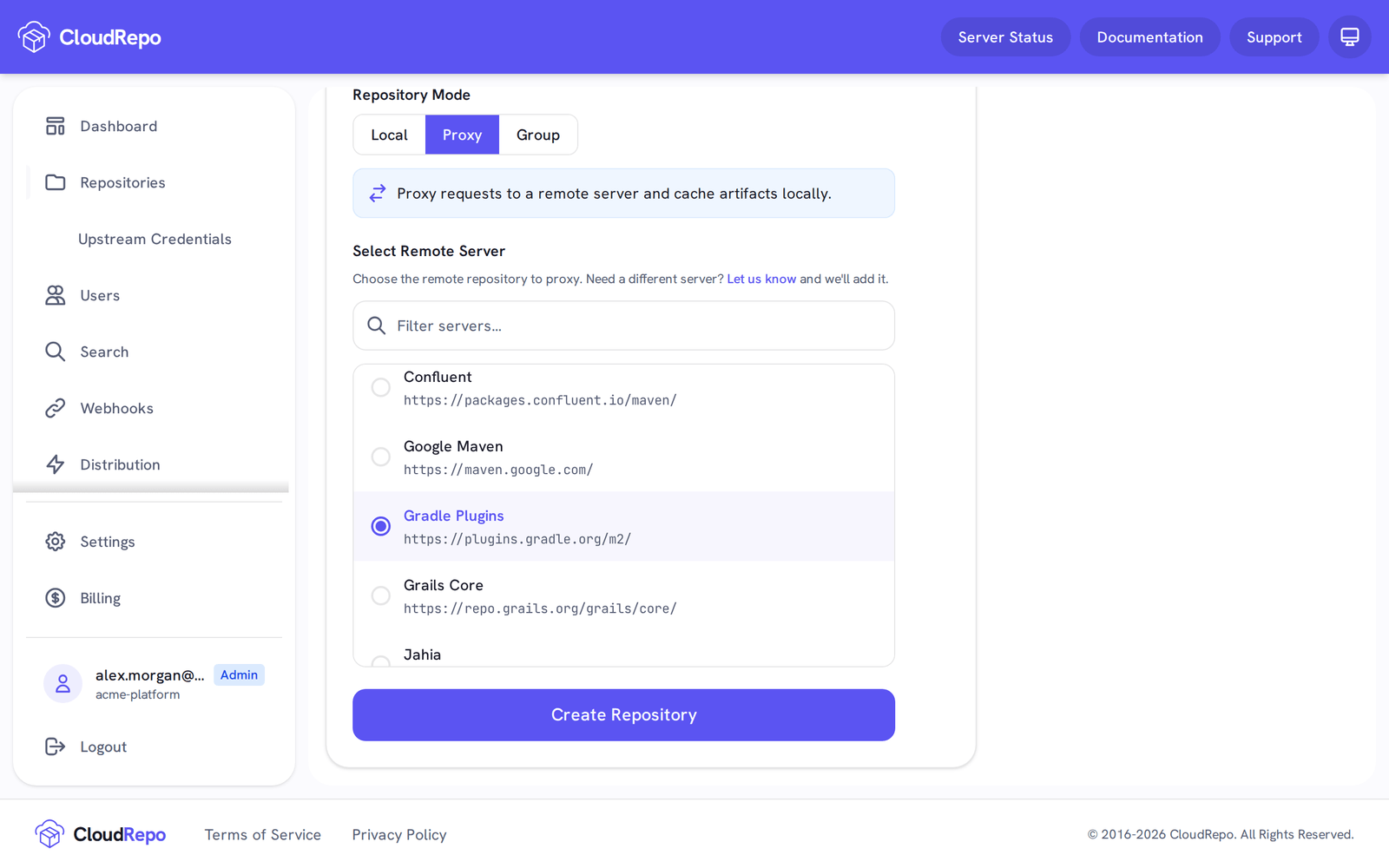
Section titled “Creating a Proxy Repository”Creating a Proxy Repository is identical to creating a local repository: choose Proxy as the Repository Mode, then pick the upstream under Select Remote Server.
Supported Remote Servers
Section titled “Supported Remote Servers”A proxy repository pulls from one upstream, chosen from this list.
Maven: Maven Central (https://repo.maven.apache.org/maven2/), Apache Snapshots, Atlassian,
Clojars, Cloudera Repositories, Confluent, Google Maven, Gradle Plugins, Grails Core, Jahia, JBoss
Public, JBoss Releases, LifeRay Public, Mulesoft Public, Spring Milestones and Spring Snapshots.
npm: npmjs.com (https://registry.npmjs.com, the default), npmjs.org, GitHub Packages and
jsDelivr.
Python: pypi.org (https://pypi.org).
Docker: Docker Hub (https://registry-1.docker.io), GitHub Container Registry
(https://ghcr.io) and AWS ECR Public (https://public.ecr.aws).
Don’t see a remote server that you need? See Adding Additional Remote Repositories.
Adding Additional Remote Repositories
Section titled “Adding Additional Remote Repositories”If you don’t see the repository that you need, please let us know and we’ll review it.
Upstream Credentials
Section titled “Upstream Credentials”Docker proxy repositories can authenticate to the upstream registry rather than pulling anonymously. Supplying your own credential lets the proxy pull as your account at that registry, including images that are private to it.
Upstream credentials apply to Docker proxy repositories. The proxy fetch path for Maven, npm and PyPI does not present a credential, so no credential fields are offered for those formats.
Where a credential can live
Section titled “Where a credential can live”A credential can be attached in three places:
When you create the proxy repository. For a Docker proxy, the Create a Repository form has an Upstream Credentials section (optional).
On one repository. Open the repository, then Settings → Upstream Credential.
On your organization, as a default for one upstream registry. Open Repositories → Upstream Credentials in the left-hand navigation. A default authenticates every proxy repository that pulls from that registry and has no credential of its own, so a rotation is one change instead of one per repository.
Which credential a pull uses
Section titled “Which credential a pull uses”Resolution runs in this order, and the repository’s own Settings page names the winner for that repository:
- The repository’s own upstream credential, if one is set.
- Your organization’s default for that repository’s upstream registry, if one is set.
- Anonymous.
A credential set on an individual repository therefore overrides the organization default for that repository, and leaves every other repository on that registry using the default. Removing the default returns every repository it covers to anonymous pulls.
Setting, rotating and removing
Section titled “Setting, rotating and removing”Setting and rotating are the same action, and both replace the credential completely: supply the username and the access token in full. There is no half to keep: CloudRepo stores the access token encrypted and does not return it, so it cannot be shown, copied, or partially updated. The portal shows only that a credential is stored, and the username it was stored with.
Use a personal access token where the registry issues them, rather than your account password.
Removing a credential leaves the repository proxying. It simply stops authenticating and falls back to the next entry in the order above.
Public repositories always pull anonymously
Section titled “Public repositories always pull anonymously”A public proxy repository never presents an upstream credential, and neither a repository credential nor an organization default changes that, so a public repository’s pulls never reach the upstream registry under your account.
CloudRepo enforces this in both directions: a repository that stores an upstream credential cannot be made public, and a public repository cannot store one. To authenticate a repository’s pulls, turn off Public Access first.
Supported upstream registries
Section titled “Supported upstream registries”An organization default can be set for the Docker registries CloudRepo proxies:
- Docker Hub:
https://registry-1.docker.io - GitHub Container Registry:
https://ghcr.io - AWS ECR Public:
https://public.ecr.aws
Don’t see the registry you need? Please see Adding Additional Remote Repositories.
Connecting to Proxy Repositories
Section titled “Connecting to Proxy Repositories”Uploading to Proxy Repositories
Section titled “Uploading to Proxy Repositories”Uploading to a proxy repository is not permitted, from a build tool or from the Admin Portal: a proxy holds only what it fetched from its upstream.
Connecting Maven Clients to Proxy Repositories
Section titled “Connecting Maven Clients to Proxy Repositories”A proxy repository is read like any other repository of its format. See Maven Repositories, npm Repositories, Python Repositories and Docker Repositories.
Removing Cached Dependencies
Section titled “Removing Cached Dependencies”Dependencies can be removed from your proxy repositories by deleting them like you would for any other artifact. The next request for one fetches it from the upstream again. See deleting files and folders for more information. A deleted proxy file cannot be restored from the Trash.