Publish Python packages to CloudRepo
Python packages reach CloudRepo through twine, the same tool and the same upload API that publish to PyPI: it needs the repository’s address and a credential. This page is for the person who publishes a package. To install what you published, see Python repositories.
Before you start
Section titled “Before you start”- A Python repository. If you have none, create one.
- A repository token that reaches it, with Read + write. A Read only token can install but not
upload: CloudRepo answers its
twine uploadwith403. See Repository tokens to create one. Your username is the email address of the account that created the token, not__token__, and your password is the token. - A project that builds a wheel or a source distribution, usually from a
pyproject.toml. The Python Packaging User Guide covers that. - twine, installed with
pip install twine. - Your repository’s URL,
https://<organization>.mycloudrepo.io/repositories/<repository>. Your organization’s name is the first part of your CloudRepo host, and the repository’s name is the one the admin portal shows. twine uploads to this URL without/simple/.
Upload with twine
Section titled “Upload with twine”1. Put the upload credential in ~/.pypirc. twine reads the repository’s address and your credential
from this file, under a name you choose (cloudrepo here). Keep the file readable by you alone
(chmod 600 ~/.pypirc), because it holds the token.
[distutils]index-servers =    cloudrepo
[cloudrepo]repository = https://your-org.mycloudrepo.io/repositories/your-repousername = you@example.compassword = YOUR_REPOSITORY_TOKEN
2. Build your distributions into dist/:
pip wheel . --no-deps -w dist3. Upload them.
twine upload --repository cloudrepo dist/*Expected: twine prints Uploading distributions to the repository’s URL and the name of each file,
then returns without an error.
4. Check that it landed. Ask the repository for your project’s page. Put the credential in
~/.netrc and ask curl to read it, and keep that file readable by you alone, too.
machine your-org.mycloudrepo.iologin you@example.compassword YOUR_REPOSITORY_TOKENcurl --netrc --fail --silent https://your-org.mycloudrepo.io/repositories/your-repo/simple/my-package/Expected: a page titled Links for my-package with a link to each file you uploaded. The project’s name
in that URL must be the normalized one: lowercase, with every run of -, _ and . made one -.
CloudRepo stores your files under that name, and a URL that spells it another way, such as
/simple/my_package/, does not list them. The files are also listed in the repository in the
admin portal, under the normalized name.
Publish from CI
Section titled “Publish from CI”Keep the token in your CI’s secret store, expose it as the environment variable CLOUDREPO_TOKEN, and
give twine its credential through its own environment variables, so no file is written. Add
--non-interactive, so a missing credential fails the job instead of waiting for someone to type.
export TWINE_USERNAME="you@example.com"export TWINE_PASSWORD="$CLOUDREPO_TOKEN"twine upload --non-interactive \ --repository-url https://your-org.mycloudrepo.io/repositories/your-repo \ dist/*Publish a file once
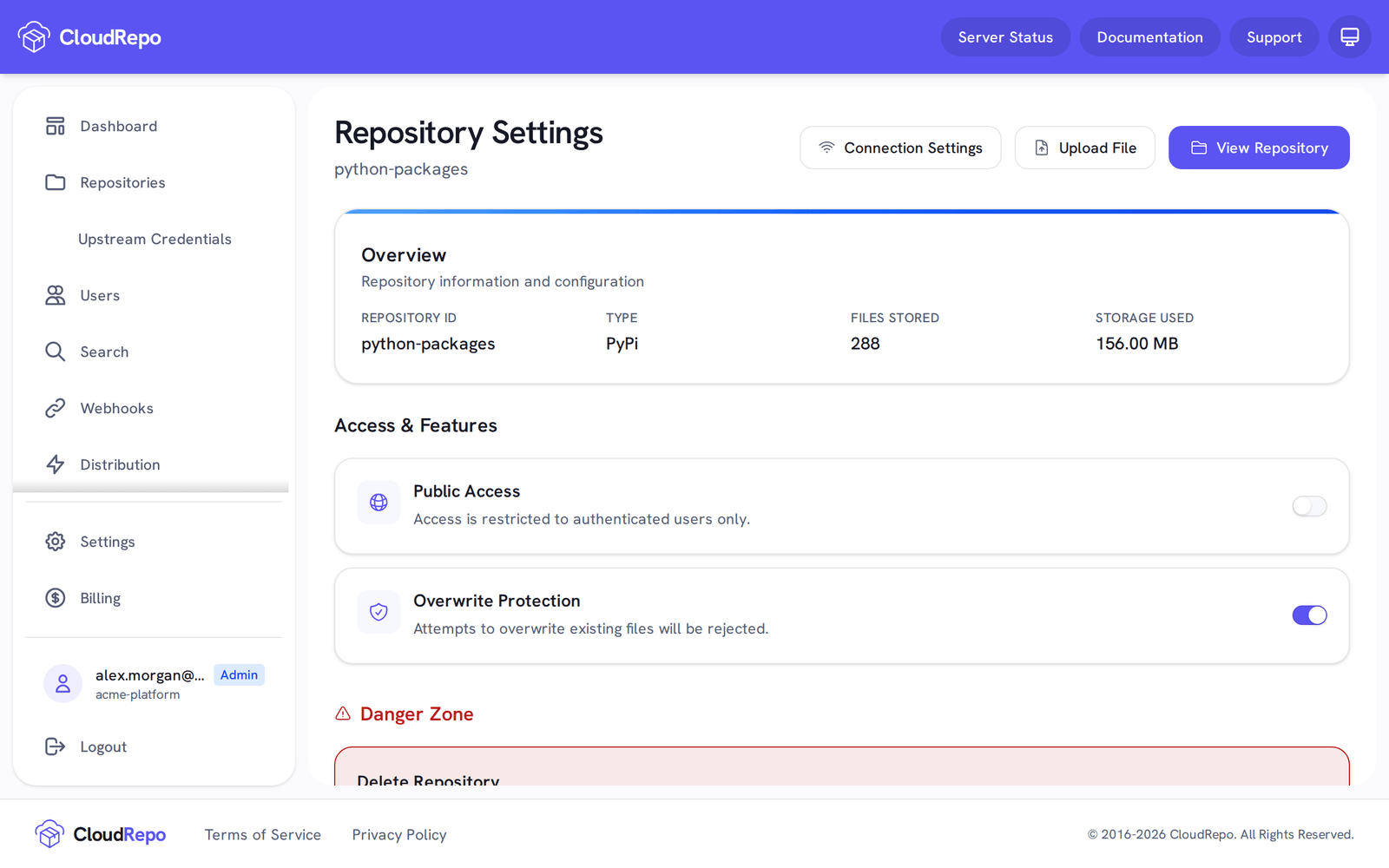
Section titled “Publish a file once”Overwrite Protection is on by default for a Python repository. With it on, uploading a file to a path
that already holds one is refused with 409 Conflict, and the stored file is left as it is. Python has no
mutable-version convention, so there is no equivalent of Maven’s -SNAPSHOT: no file is exempt. To
publish again, use a new version number. If the repository is meant to accept republished files, turn
Overwrite Protection off in its settings instead; see
Overwrite Protection.
twine prints only the status line, HTTPError: 409 Conflict. To read the explanation CloudRepo sends with
it, run the upload again with --verbose. twine then prints CloudRepo’s JSON answer, whose error field
reads:
Attempting to Overwrite an existing file. Overwrites have been disabled for this repository.Each upload can be up to 5 GiB (5,368,709,120 bytes) in all, a wheel or source distribution together
with any signature file uploaded alongside it. A larger upload is refused with 413 Request Entity Too Large.
When an upload is refused
Section titled “When an upload is refused”twine prints the status line and, by default, nothing more. Run it again with --verbose to print the
response. Check these in order:
- 401 Unauthorized. The credential was refused. The username must be the email address of the account
that created the token.
__token__, the convention on pypi.org, is refused, and so is a token’s name. The password must be the token itself. A token that is expired or revoked is refused too: the Repository Tokens page in the admin portal shows its status. - 403 Forbidden. The token cannot upload here. A Read only token cannot upload at all, and a token reaches only the repositories ticked when it was created. Use a Read + write token that includes this repository.
- 409 Conflict. The file is already in the repository. See above.
- 413 Request Entity Too Large. The upload is over 5 GiB. See above.
InvalidConfiguration: Missing 'cloudrepo' section from ~/.pypirc.twine 7.0.0 prints this when--repository cloudreponames a section that~/.pypircdoes not have, and when there is no~/.pypircat all. Put the file in your home directory, with a section whose header is the name you gave--repository.NonInteractive: Credential not found for username.(orfor password). You ran twine with--non-interactiveand it had no credential to send, so it sent nothing. SetTWINE_USERNAMEandTWINE_PASSWORDin the shell that runs twine, or give the~/.pypircsection ausernameand apassword. Without--non-interactive, twine asks you for the missing value instead.
More: Repository tokens, for every client’s credential; Python repositories, for installing and for installing private and public packages together; for uv and Poetry, see the uv and Poetry pages.