Access Log
The Access Log answers a simple question: who touched this file? It lists the uploads, downloads and deletes in your organization’s repositories, newest first, with who did each one and when. Downloads from a public address, or with no sign-in, are not listed.
It’s included on every plan. It’s in early access, so we improve it every day. Tell us what you think in the portal’s chat.
To see what one build agent pulled, give it its own token. What Did Your Build Agent Pull? shows how.
Open the Access Log
Section titled “Open the Access Log”- Sign in to the admin portal as your organization’s owner or as an Admin.
- In the sidebar, choose Access Log.
The owner and any Admin can open it. Other members see a lock on the entry, and it takes them to a page where they can ask to be an Admin.
Opening the log is itself recorded in the Audit Log.
What Each Row Shows
Section titled “What Each Row Shows”Each row is one upload, download or delete. The page loads 200 rows at a time, and Load older adds the next 200.
- Time (UTC): the day and the time, to the second.
- Action: Uploaded, Downloaded or Deleted.
- Artifact: the file, or its package and version. When a row has both, the package and version sit under the file.
- Repository: where it happened.
- User or token: who did it. A person shows as their email address. An organization token shows its name and its kind.
A member’s own token shows its name, with the member’s email address beside it. That way you can see which build pulled a file, and whose token it used.
Work done in the admin portal is listed too, and so are downloads through a proxy or group repository.
One pull can make many rows in the log, because each file is its own row. A Docker pull reads a
manifest and its layers. Maven reads .pom, checksum and metadata files along with the artifact.
The page opens showing packages only. Packages only hides the uploads and downloads of checksum, signature and metadata files. A line above the list says how many files it left out, and the CSV still has all of them. Turn Packages only off to see them in the list.
New rows can take a short while to show up.
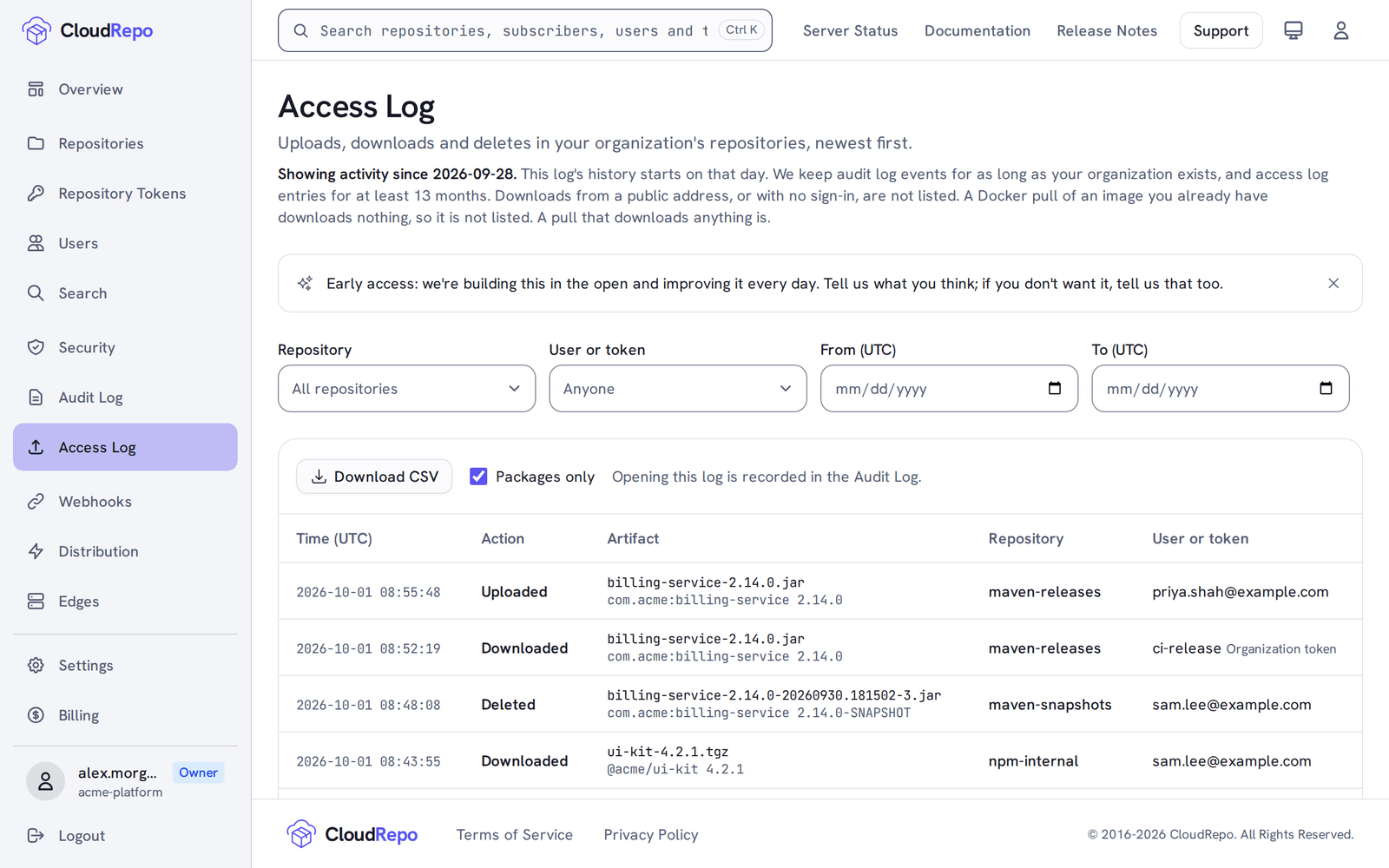
Filter the List
Section titled “Filter the List”A filter searches the whole log, not only the rows on the page.
- Repository: one repository.
- User or token: one person or one token. A person shows all of their rows. A token shows only its own.
- From (UTC) and To (UTC): whole days in UTC. Both days are included.
The Repository list shows your organization’s repositories. The User or token list shows what’s in the rows you’ve loaded so far, so a name may appear only after Load older. To go straight to one token, choose See activity beside it on Repository Tokens.
Clear filters removes them all. On a phone, choose Filters to open them.
Filters stay in the page’s address, so you can bookmark a view or share it with another Admin.
Download the List
Section titled “Download the List”Download CSV saves the rows the page loaded, with your filters applied, including the ones Packages only hides. Any older rows you’ve loaded are in the file too.
While more rows remain, a second button saves them all in one file. It reads Download all for this filter, or Download all with no filter set. The file stops at 5,000 rows, the newest ones, and the page says so when it does. Narrow the dates to get the rest.
The file has twelve columns: Time (UTC), Action, Artifact, Package and version, Repository, User or token, Token kind, Timestamp (UTC), Token id, File digest, Token name and Trusted publishing binding. Four of them aren’t on the page:
- Timestamp (UTC) is the time to the millisecond.
- Token id is the id of the token that made the row. It’s blank for a password, a portal session or a download link.
- File digest is the file’s digest where the row records one. What Each Row Records says which downloads do.
- Trusted publishing binding is blank for rows a person or a token made.
Token name is the name the page shows for the token that made the row. For a member’s own token, User or token in the file still holds the member’s email address.
How Far Back It Goes
Section titled “How Far Back It Goes”The line under the page title says where the list starts: Showing activity since and a date. That date is the day the access log started, or the day your organization was created if that came later. Nothing older shows, however long you’ve been with us, and the From (UTC) picker stops there.
We keep access log entries for at least 13 months.
What the Access Log Doesn’t Cover
Section titled “What the Access Log Doesn’t Cover”The log is about files. These aren’t in it:
- Downloads with no sign-in. A file fetched from a repository’s public address, or by someone who isn’t signed in, isn’t listed.
- Requests that fetch no file. HEAD requests, directory listings and npm and Python index pages aren’t downloads. A Maven metadata file is a file, so it’s in the log. Packages only hides it from the list, and the CSV still has it.
- Refused requests. Only what went through is here. The Audit Log covers refusals, and its page says which ones.
- Deleting a whole repository. Its files don’t get a row each.
- Everything else in your organization. Sign-ins, tokens and members belong to the Audit Log.
A build never waits on the log. If a row can’t be saved, the upload or download still goes through, so a row can be missing.
Need something here that the log doesn’t show? Tell us in the portal’s chat.